
Discovery browse queries
The browse query is ideal when retrieving data from a single specific shape in Crystallize. It provides a fully semantic API, where the structure of the response mirrors the naming of your shapes and components.
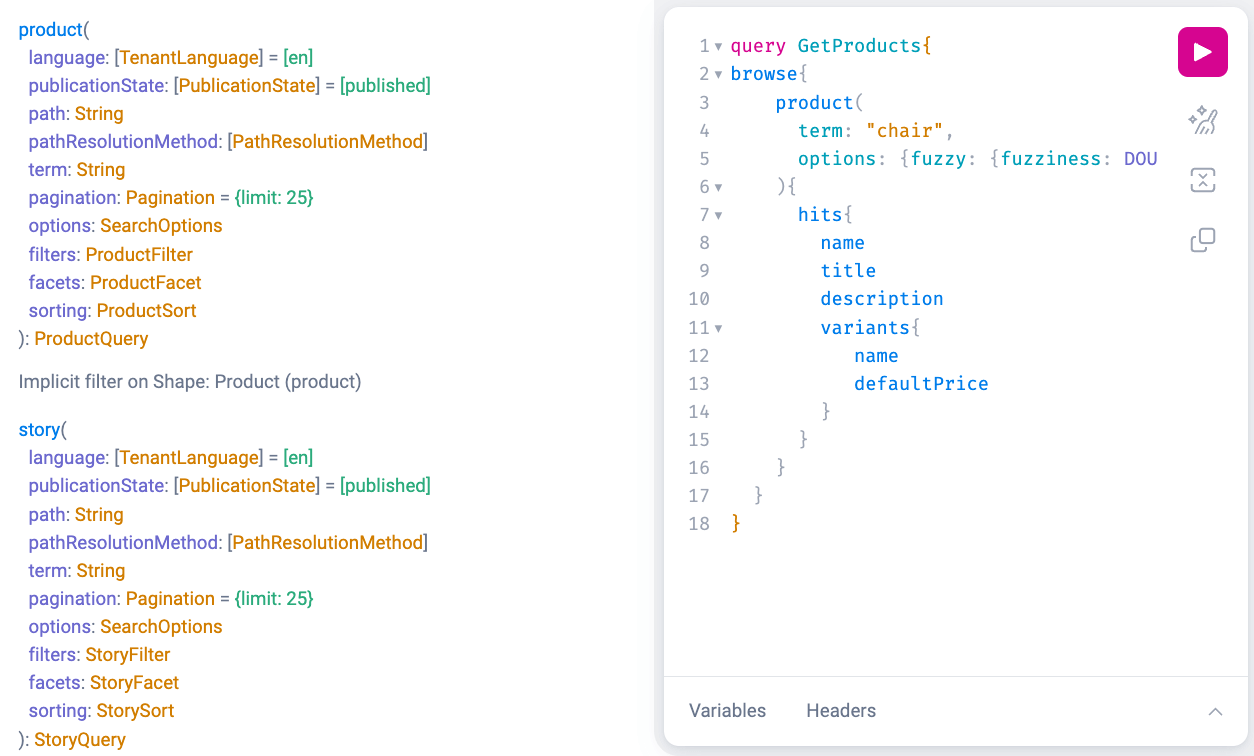
Browse
The Browse query is shape-first: it lists catalogue items one Shape at a time. Under the browse field, every Shape in your tenant is exposed as its own field, named after the Shape's identifier (for example, product or blogPost). Selecting that field implicitly filters the results to that single Shape.
Because each field returns items of one known Shape, the response is fully typed. Unlike the standard search query, you don't need inline fragments (e.g. ... on Product) to structure results by shape — you can request the Shape's components directly.
Each Shape field accepts the same arguments — term, filters, facets, sorting and pagination — while the available filters, facets and sort fields are generated specifically for that Shape's components. Every field returns a summary (total hit count, facet results and pagination tokens) and a list of hits.
Search
A search within a browse query? Yes. The browse query allows full search capabilities while maintaining a semantic response. Unlike the standard search query, it does not require inline fragments (e.g., ... on myshape) to structure results based on shape. This simplifies the response format while preserving relevance.
To perform a search within your browse query, you must provide a search term. This searches for an exact match within your browse results.
If you want to allow for minor misspellings, you can enable the fuzzy option. Fuzziness can be set to NONE, SINGLE, or DOUBLE, which defines the maximum number of single-character edits allowed to match the search term.
- NONE means only exact matches are returned.
- SINGLE allows one character difference (e.g., "cart" matching "cat").
- DOUBLE allows up to two character differences (e.g., "color" matching "colur").
Filtering
You can filter results based on both core fields and component values, helping you find exactly what you need.
Examples of core fields you can filter on are:
- Name
- Variant name
- SKU
- Prices
- Stock values
- Path
- Topics
Component-level filters depend on the specific components in your shape. The available filters for your setup can be found in the Playground documentation within the Discovery API for your tenant.
Filters are combined with the AND and OR operators, and each field offers operators suited to its type: text fields support equals, contains, in, phrase and regex, while numeric and date fields support range comparisons (gt, gte, lt, lte).
Faceting
Faceting lets you refine results using structured filters, often used in the UI to help users narrow down results dynamically based on predefined categories or attributes.
You can apply faceting to both core fields and many component values within your shape. To see the exact faceting options available for your tenant, refer to the Playground documentation, which reflects the shapes and components defined for your setup.
Request a facet by naming the field and providing a key to look it up under summary.facets, together with a limit on how many values are returned. Numeric and date facets also accept boundaries to group values into ranges. Like filters, the facets argument is generated for the selected Shape's components, in addition to core facets such as topics.
Sorting
You can sort results (hits) based on both core attributes and component values. Multiple sorting methods can be combined, using either ascending or descending order.
You can also sort by relevance using the score field. When several sort fields are provided, they are applied in the order given.
To view the full list of sorting options available for your tenant, check the Playground documentation.
Pagination & Efficient Data Fetching
Browse results are paginated through the pagination argument. Use limit to set how many hits are returned per page (default 25).
To page through results, prefer cursor-based pagination: read the endToken from the response summary and pass it as after (or before to page backwards) on the next request. A skip offset is also available, but it is less performant on large result sets.
When retrieving data from Crystallize, it’s important to fetch in batches. Avoid requesting more component data and relations than necessary, and limit the number of results fetched at once.
While there is no strict limit on batch size, we recommend using pagination to retrieve only the data needed initially. The optimal batch size depends on payload complexity:
- If fetching large datasets (e.g., 50 components per item, each with 10 relations and multiple fields), consider retrieving 10–20 items at a time.
- If fetching lightweight data (e.g., only names and paths for generating a sitemap schema), you may retrieve up to 100 items at a time.
Avoid fetching all tenant data in a single request, as this can lead to inefficient performance, and your query might even be blocked by Crystallize.