
Tiered Pricing
Tiered pricing lets you set quantity breakpoints so larger orders get a lower unit price. Tiers are defined per price variant and per currency, and the effective unit price is resolved from the quantity at query time — in the cart, in your storefront, and in search.
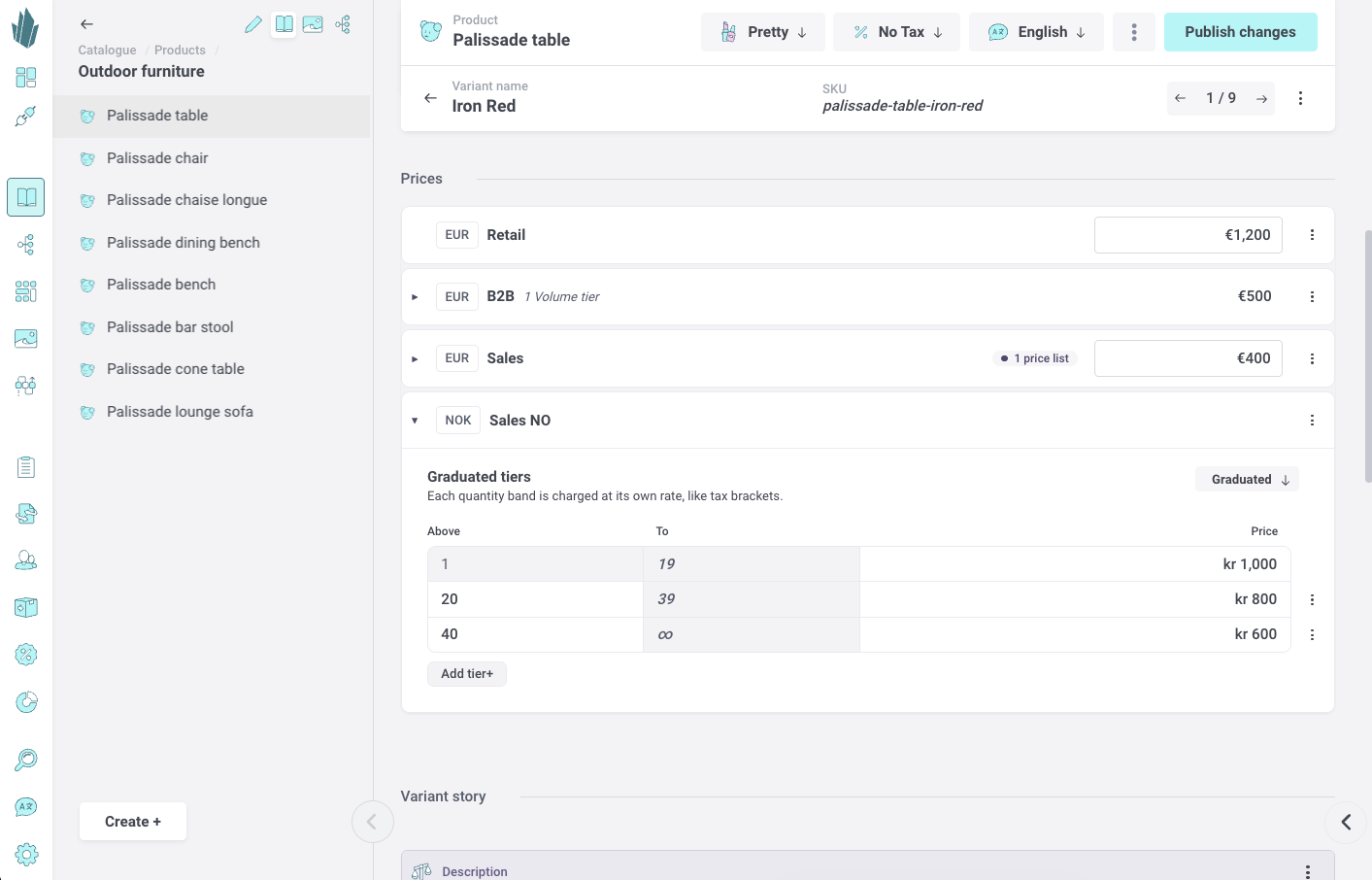
Tiered pricing lets a product's price variant charge a different unit price depending on the quantity ordered. Use it for volume discounts and wholesale-style pricing, where larger orders earn a lower per-unit price. You set tiers up once per price variant in Settings, enter tier prices when pricing each product, and the APIs resolve the effective unit price from the ordered quantity.
What is a price tier?
A tier is a quantity breakpoint on a product's price variant: a minimum quantity (the threshold) paired with a price. Tiers form a ladder — for example, 1+ at 100, 11+ at 89, 51+ at 79. Thresholds are whole numbers, the first threshold is always 1, and thresholds must increase. Tiers apply only when a quantity is known; without a quantity, the flat base price is used.
Tier types: volume vs graduated
Each tiered price variant uses one of two tier types:
- Volume — the whole ordered quantity is charged at the price of the single tier it lands in.
- Graduated — each quantity band is charged at its own rate, like tax brackets. The effective unit price is the blended average across the bands the quantity spans.
Per price variant and per currency
Tiers live on individual price variants. Because each price variant carries a single currency, tier ladders are effectively per currency: you set thresholds and prices independently for each price variant a product uses.
Set up tiered pricing in Settings
Setup happens once per price variant, in Settings > Price variants. Here you enable tiered pricing on a price variant and decide how much freedom editors have when pricing products — freeform, preset-driven, or both. Actual tier prices are entered later, when pricing each product.
Enable tiered pricing on a price variant
Open a price variant and find the Tiered pricing section. Choose Enable tiered pricing to reveal the configuration controls. Use the Disable link to turn it off again.
Choose the tier structure
The Breakpoints dropdown controls how tiers are defined when pricing products:
- Only freeform — each product defines its own quantity breakpoints from scratch. No presets are stored on the price variant.
- Freeform + preset — you define named presets as starting points; when pricing a product, editors can adopt a preset or build custom tiers.
- Only preset — every tiered price uses your preset breakpoints exactly. Editors can only fill in prices; thresholds and tier type are locked.
Define presets
When a preset structure is selected, add one or more presets. Each preset has:
- A label — a unique name so editors can recognize it.
- A tier type — Volume or Graduated.
- Thresholds — the quantity breakpoints, shown in a From/To grid. The first breakpoint is fixed at 1, each From is editable, and the To column is derived automatically (the last tier is open-ended, shown as ∞). Use Add breakpoint to extend the ladder.
Breakpoints must be whole numbers of 1 or more, start at 1, and strictly increase.

Copy presets from another price variant
If other price variants already define presets, a Copy from another price variant section lists them. Click a preset to add it here, or use Copy all to bring them over at once. Presets already copied appear dimmed.

Price a product with tiers
Once a price variant has tiered pricing enabled, you enter tier prices when pricing a product. This works in two places — the single product variant page and the data grids — and behaves the same way in both, per price variant.
On the single product variant page
Each price variant shows a tiered pricing section. Depending on the price variant's structure you either pick a preset from a picker or define custom (freeform) tiers, then fill in the tier table. The table has an Above column (minimum quantity), a read-only To column (the ∞ symbol on the last, open-ended tier), and an editable Price column. A tier type control (Volume/Graduated) sits at the top of the table, and Add tier / Remove tier actions manage rows.
For preset-locked price variants ("Only preset"), the thresholds and tier type are read-only and rows cannot be added or removed — only the prices are editable.

Using tiers in the data grids
In the item data grid and the catalogue data grid, each price variant has a tier cell, grouped under a Price tiers header. When collapsed, the cell summarizes the tiers (for example, quantity ranges with their prices) or shows "Price missing" when the structure is set but prices are not yet filled in. Empty, non-tiered cells stay muted.
Opening a tier cell reveals the same tiered pricing editor found on the product page: a toggle to enable tiers, the choice to use a preset or define custom tiers, the tier type control, and the tier table. You can copy a tier cell and paste it into another — the thresholds and tier type carry over, while prices come along only when the target price variant uses the same currency; otherwise they are left blank for you to fill in. Pasting into a preset-locked cell keeps the preset's thresholds.
How the effective price is resolved
Given a quantity, the tier type decides the effective unit price. Take a ladder of 1+ at 99, 11+ at 89, 51+ at 79, 101+ at 65, and an order of 60 units:
- Volume — 60 lands in the 51+ tier, so all 60 units are priced at 79 (line total 4740).
- Graduated — the first 10 units cost 99, the next 40 (units 11–50) cost 89, and units 51–60 cost 79: (10×99 + 40×89 + 10×79) ÷ 60 = 89 per unit.
If no quantity is supplied, or the price variant has no tiers, the flat base price is used instead.
Shop API: hydrating a cart with tiered prices
When the Shop API hydrates a cart, each line's quantity drives its unit price through tier resolution. The resolved unit price feeds the line totals (gross, net, and vat), and the cart item price also exposes the tier context that produced it:
- tierType — volume or graduated.
- tiers — the full ladder of threshold/price pairs.
- resolvedTier — the tier that applied for the line's quantity.
Promotions stack on top of the resolved unit price: tiers are resolved first, then discounts apply to the resulting amount. For the full cart lifecycle and promotion behavior, see the Shop API documentation.
Discovery API: querying published products
In the Discovery API, published products expose tiers on their price variants, so storefronts can display the ladder and resolve a unit price for a given quantity:
priceVariants {
  identifier
  currency
  price        # flat base price
  tierType     # volume | graduated (absent when not tiered)
  tiers {
    threshold
    price
  }
}
priceVariants {
identifier
currency
price # flat base price
tierType # volume | graduated (absent when not tiered)
tiers {
threshold
price
}
}For how to filter, sort, and resolve a price by quantity when querying products, see the Discovery API documentation.
Backward compatibility
Tiered pricing is fully backward compatible. On every price variant, the base price field keeps returning a flat price, so existing storefronts and integrations that query a price without a quantity are unaffected.
- Products without tiers behave exactly as before: no tierType, tiers, or resolvedTier is emitted, and the flat price is used everywhere.
- When a price variant has tiers but no quantity is supplied, the flat base price is returned and the tier ladder is still exposed so storefronts can display it.
- Requesting a price with a quantity on a non-tiered price variant simply returns the flat price.
- Subscription pricing is independent of product price-variant tiers and is unchanged.